How to download private Vimeo videos
Disclaimer: This post does not explain how to circumvent Vimeo’s protection to access private videos. You will still need access to the private video you are trying to download, presumably by paying for it.
I paid for access to a video tutorial site and I wanted to archive their video collection to my computer for future viewing. The videos were all embedded from Vimeo and private but fortunately I figured out how to download them .. there are 2 ways:
Sometimes they will embed the .mp4 stream directly, sometimes they will embed the Vimeo window as a browser object. To find out which method is being used, open the page where the video is on and go to View Source ..
Do a search for .mp4 and/or vimeo. If you find a .mp4 link like this:
Then skip the next step, however if you don’t find anything ending in .mp4 but instead can only find something like this:
http://player.vimeo.com/video/5111113
Then click that link (note you have to click the link directly from view source, pasting it into a new browser window will not work) and you should see your video in full screen.
From that page, right click and choose View Source and search for .mp4, you should find multiple links to .mp4 streams. The links will have within the code the ‘profile’ for example SD or h264, you should also be able to see the width/height of the video. Select the .mp4 link with the quality settings you require.
For the final step, create a .html file with a hyperlink in it and paste your .mp4 link in there.
Example:
download
Now open that .html file in your web browser and right click ‘Save link as ..’ and you will be able to save the Vimeo video as an MP4 to your computer.
Alternate Method
***I received a ton of emails saying the above method doesn’t work, it appears that Vimeo has different ways of delivering and protecting these videos. Fortunately some of these people struggling with the above method sent me the link and login so I was able to figure out how to download those too.
Step 1) Open Google Chrome Developer Tools
Step 2) Click the Elements tab, this will show the code of the page. Expand the body tag and get to the
Follow the below screenshot and expand the lines I have highlighted in red until you get to an .mp4 link.
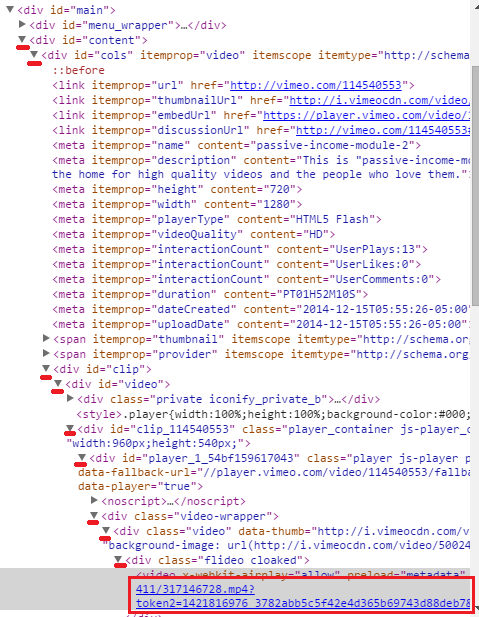
Step 3) Once you see the .mp4 link, click it and you will see in Chrome the following link, right click this and choose ‘Open link in new tab’ .. this will open the video in a new tab.

Step 4) Once the video is opened , you can right click it and choose Save Video As ..