Did you know that changes to LinkedIn could be impacting your visibility? No matter why you use LinkedIn- for job search, to promote your business or just to stay connected, you should know how people find you and learn how to improve your profile and status updates for increased visibility.
Are Your Status Updates Getting Seen?
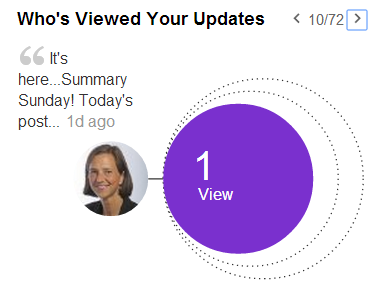
You can review the stats from each of your status updates on the far right of your screen. This is one way to assess your visibility on LinkedIn. Are people viewing your updates? This first update below is plain-old embarrassing. As a frame of reference, this number used to be in the hundreds (like the next one!)
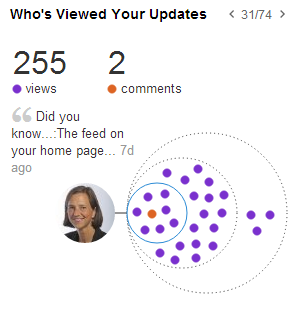
Quick Tip: You can increase the number of views by sharing your update in groups. Ideally professional groups related to your desired occupation. Sharing content within groups creates an awareness of you and helps develop a brand. Always think about what you want to be known for and share that type of content, either that you’ve written or someone else’s work.
Show Me “Top” or “Recent”: LinkedIn Decided for You
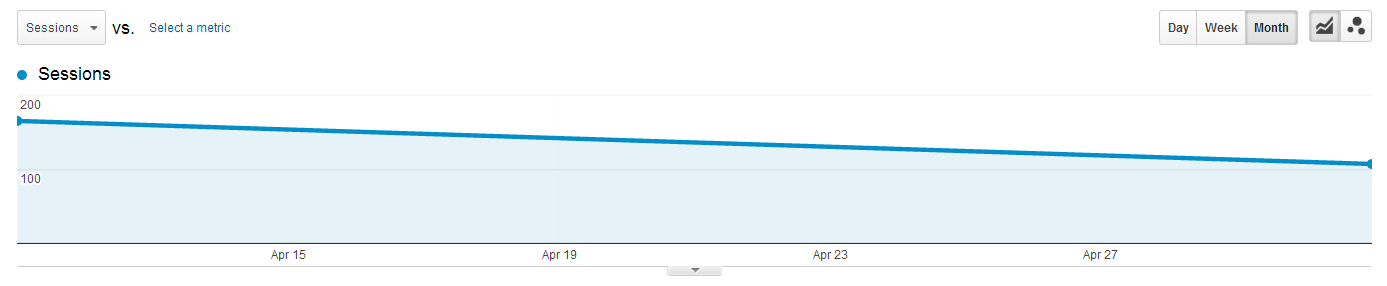
LinkedIn has made changes to the order or priority of your home feed. I’ve been watching the stats on who visits my site from LinkedIn, and I’m not liking what I’m seeing. As you can see from the graph below, there has been a steady decline in referrals from LinkedIn to my blog. I haven’t made any other changes to how or what I am sharing on LinkedIn, so that isn’t a factor.
I can only assume that fewer people are seeing my updates. And this is probably happening to you too.
Many people, some with LinkedIn publishing access, have also noticed a decline in views. Katrina Collier of Winning Impress wrote this post with her conjecture and tips to improve post views here: “You bet it matters that LinkedIn have set your updates to Top.”
Without telling us, LinkedIn decided to change how they list status updates on your home feed. (By the way, Facebook made this change to your home feed awhile ago.) By default, you will see the “Top” status updates. This means, you will see the updates with the most likes, shares or comments before you see other updates. I don’t know about you, but I want fresh news. And if someone I know shares something, but no one likes it, I’m not likely to see it.

So here’s what I have to do each time I log into my LinkedIn account to ensure I see what my network is talking about at that moment!
Over on the right-hand side of your home feed, look for the “All Updates” button and click on the down triangle (arrow).
Choose “Recent” to see real-time updates. You will have to do this each time you log into LinkedIn if you want to see recent updates.
Improved Data on Who’s Viewed Your Profile
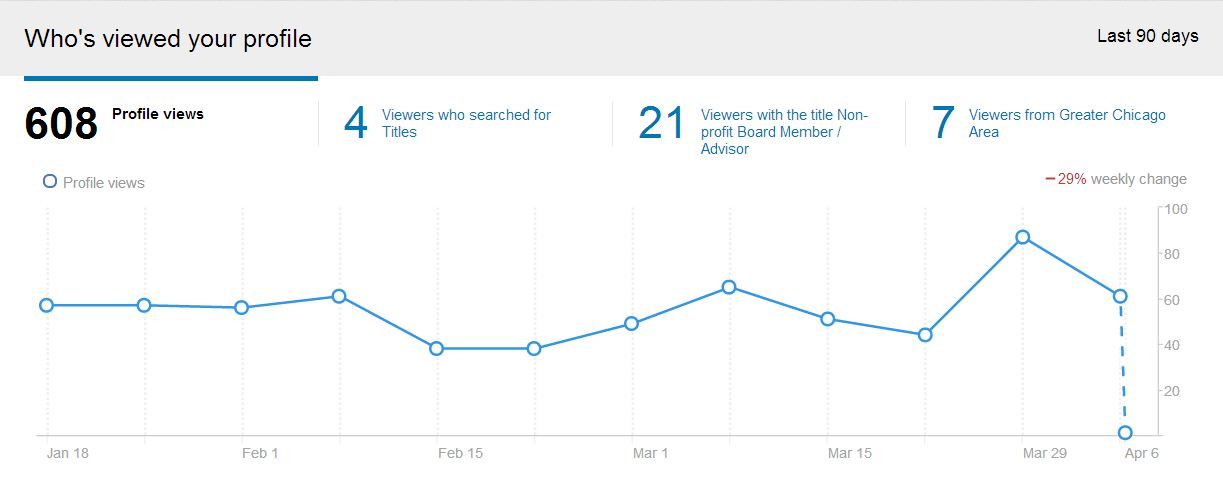
This is what your stats look like when you click on “Who’s Viewed Your Profile.”
This shows that 608 people have viewed my profile within the last 90 days. But I want to know more…don’t you?
Keyword Search Results

The next invisible tab to the right, shows the keywords people used to find me (pink circle) and where the viewers came from (purple circle). When you move your mouse over the circles, you can see more data.
This keyword data helps you see if the wording in your profile is effective in attracting people. The number of views for keywords should be higher for your summary or job description.
Quick Tip: Review your profile and make sure you have a comprehensive summary and full description under each job which should increase the likelihood your profile will get found.
The purple circle shows where 390 people found my profile. The majority of people found my profile because of something I posted (a status update) and showed up on their homepage.
Quick Tip: By posting status updates, you have a huge opportunity to increase the number of people who view your profile. It is almost like you are listing a new house…everyone wants to see inside!
Viewers’ Titles

The next invisible tab to the right shows information about who the viewers are by their job titles and industries.
Quick Tip: As a job seeker, you might see more “Human Resources” and “Recruiter” job titles or at least want to see those titles. You will also want to see the titles of Hiring Managers who may be scoping you out.
The industry circle helps you see if you are attracting views from the correct industry. This may also help you increase the types of companies you look for opportunities within.
Viewers’ Cities
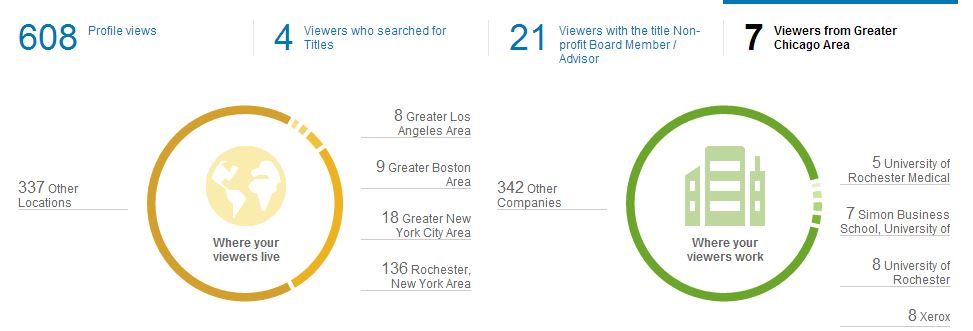
The next set of data is tells you about the people who have viewed your profile- where people live and work! The green circle is pretty valuable, especially because I don’t have the paid version to see the actual people viewing my profile. There are numerous views from UofR (and related branches) because I do some work there. These views are likely from people I meet with.
Quick Tip: The company stats could help you determine if your application has been received or that an interviewer is checking you out.
To Pay or Not To Pay For Advanced Insights
I am not a paying member of LinkedIn, so I can’t see the names of people who viewed my profile. Arnie Fertig, a colleague of mine, was kind enough to show me his results as a paid subscriber. For every circle of data, Arnie can see the profile information of people who viewed his profile. As a job seeker, paying for this is only worth while, in my opinion, if you are going to actually do something as a result of having access to the information. In other words, if you see someone has viewed your profile and you are curious, then you should In-mail them a message.
**One thing is for sure…we’ll continue to see changes across all social networks. It helps to keep your toe in the water so you know what’s happening. **
Related Posts:
 Motivation Monday: Prime the Pump
 Summary Sunday: Fixes for the New Year
 Summary Sunday: Learn How To Use Social Media To Improve…
Share on facebookShare on twitterShare on emailShare on pinterest_shareMore Sharing Services(L)5